Verification links
Verification links are links that you can send to your users to programmatically verify their identity. Your users receive a link, open it, and are then directed to a one-off web interface where they can scan their identity document.
Verification links require no authentication. Opening the link will create the transaction on the backend, and render the interface in the browser, based on the provided workflow.
In order for verification links to work, you first need to create a workflow.
One link, one user
Verification links are single-use only. You must not send the same verification link to multiple users, as each link is scoped to one transaction.
In other words, verification links can share a workflow, but cannot share a transaction.
Whenever you need a user to go through your workflow, generate a new link for them.
Creating verification links programmatically
Read the API docs for verification links to learn how to call the API and create your verification links.
Links created via API can be configured to use the correct run address.
Since you control how users' consent is collected there, they can be used in production.
Creating verification links in the UI
These links don't collect your users' consent. Therefore, do not use them in production. These links should only be used to try a workflow out.
Go to your workflows page, find your workflow, and then click the three dots to open the Versions and status page for your workflow.
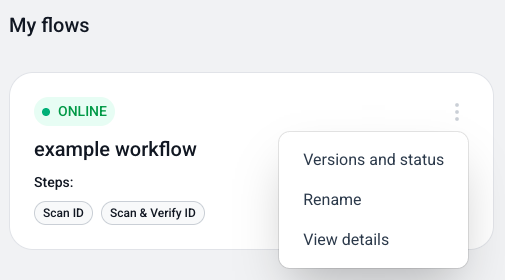
On that page, Try verification link will generate a verification link where you can try the workflow out.